Collapick Tempo ERP – all solutions
Features and integrations
Powered by the open-source Odoo
Collapick Tempo ERP is built on Odoo, the world’s most popular open-source enterprise resource planning system.
Tempo takes Odoo’s core features further, adapting them to the practical needs of different industries – whether your business is in the food industry, manufacturing, wholesale, or maintenance and service.
As an official Odoo partner, we also provide standard Odoo solutions tailored to your needs.
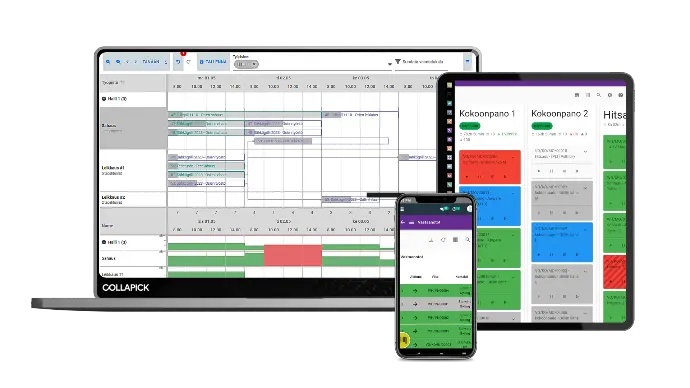
Collapick Tempo ERP features
Standard extensions you won’t find anywhere else
Production
Easier and more precise production
Collapick Odoo ERP streamlines manufacturing management, BOM maintenance, and scheduling. Visual tools and automation enable faster decision-making, better capacity planning, and more accurate tracking – ensuring smooth and cost-effective production.
BOM management
Define waste percentages for Bill of Materials (BOM) – automated waste logging during production.
Generate purchase proposals directly from the BOM to simplify procurement, tendering, and pricing.
Mass replacement of components – update a single part across all product structures automatically for effortless revision control.
Manage dimensions and variable product structures – use formulas to calculate component consumption based on width, height, or thickness.
Production tracking and linking
Streamline tracking by linking customer data, order references, and sales order numbers directly to manufacturing orders (MO).
Automated data transfer – delivery details move automatically from sales orders to manufacturing.
Drawing numbers on product cards – keep technical documentation easily accessible.
Split manufacturing orders into batches for better process control.
Visualization and capacity planning
Visualize material requirements and track production progress with precision.
Monitor production load by work center or department.
Group work centers into departments – highly effective for managing machine groups.
Automated scheduling for both manufacturing and sub-assembly orders.
Inventory
Smooth inventory management and logistics
Streamline your warehouse operations and delivery processes with GS1 barcodes, automated product document imports, and shipment consolidation. Gain full visibility into replenishment needs, manage product data without errors, and generate waybills, pallet labels, and shipping tags directly from the system.
Key features
Scan pallets during reception and manage batch numbers, serial numbers, best-before dates, and other GS1-standard data with ease.
Create new products directly from uploaded documents. The system automatically names the product based on the file and attaches the document to the product card.
Combine multiple customer orders into a single shipment to save on logistics costs.
See exactly which manufacturing, sales, and purchase orders are driving your inventory replenishment needs.
Lock product codes and names to prevent accidental errors in product management.
Generate Finnish waybills, pallet labels, and shipping tags directly within the system.
Sales
Boost sales and improve customer experience
Track sales orders, manage deliveries and invoicing, and estimate costs as early as the sales stage. Collapick Odoo ERP extends standard Odoo sales features, speeds up processes, and helps you make more accurate decisions within a single system.
Reporting and tracking
Track overall sales status at a glance with visual indicators: view purchases, shipments, and production per order and drill down into order statuses.
Monitor invoicing status with precision: see exactly which deliveries and invoices are completed, partially processed, or pending.
View sales history directly from the order to quickly understand the customer’s previous purchase patterns.
Enhanced sales reports featuring delivery reliability, lead time deviations, and custom grouping identifiers.
Production and order management
Push orders directly from sales to production: precisely define batch sizes, schedules, and bills of materials (BOM).
Direct procurement from sales orders: purchase proposals are generated automatically based on the products in the order.
Line item positioning: define the exact order of lines on sales orders for precise management.
Internal cost estimation at the sales stage: analyze the cost structure early to ensure profitable pricing.
Pricelists and deliveries
Advanced pricelist management: mass imports, customer-specific comparisons, and minimum margin targets.
One-time delivery addresses: create temporary addresses quickly—the system archives them automatically to keep your data clean.
Clear line item positioning for organized sales orders.
Invoicing and commissions
Calculate overdue interest and sales commissions directly from the order to streamline invoicing and sales commission accounting.
Purchase
Take control of purchasing and costs
Streamline your procurement processes and manage purchases with higher precision. Collapick Tempo ERP allows you to manage purchase data, line items, recurring orders, and purchase proposals effortlessly, saving time and reducing errors. Enhanced tracking and reporting provide clear visibility into costs, deliveries, and project-specific profitability.
Purchasing and order management
Use conversion rates to buy in different units of measure than you store.
Automatically inform subcontractors of the product revision during purchase.
Use line item positioning to define the order of lines and manage them precisely.
Manage and schedule purchases by combining requirements from the same supplier into one order.
Confirm and cancel purchase orders quickly with mass actions.
Blanket orders automate recurring purchases and ensure steady delivery without separate orders.
Reporting and tracking
Enhanced purchase reports for precise tracking of quantity deviations, costs, price trends, and detailed grouping.
Manage pricelists more easily with the purchase pricelist extension.
Monitor cost and purchase price trends with precision.
Allocate purchases directly to projects for accurate project-specific profitability reports.
Link purchases to manufacturing orders to allow buyers to track purchases based on the product being manufactured.
Project Management
Ensure project profitability and efficient resource allocation
Manage projects, schedule resources, and track task progress in real time. Collapick Odoo ERP integrates project budgeting, time tracking, and material costs into a seamless workflow, providing a precise view of project-specific profitability and streamlining invoicinsing.
Project creation and customization
Create new projects easily and manage project status.
Customize projects with stages, tags, priorities, color codes, and custom fields.
Create a project directly from a sales order or a sales order from a project.
Resources and Scheduling
Manage employees, equipment, and materials across different project stages
Schedule resources efficiently based on project progress
Tasks and multi-project management
Create, prioritize, and track project tasks in real time.
Work on multiple projects simultaneously and perform extensive analyses.
View ongoing tasks for all projects in a single view.
Reporting and tracking
Create status reports and track planned vs. actual costs, hours, and revenue.
Budjeting and expence management
Define project budgets and select invoicing methods, such as automated billing based on time spent.
Log warehouse materials directly as project expenses.
Easy entry of hours and expenses for projects, including per diems and travel expenses.
Case management
A centralized tool for managing deviations, claims, and change requests
Case management helps you handle revision changes, sales and purchase claims, production deviations, and customer service requests (RMA). By grouping and analyzing this data, you gain valuable reports for developing quality, service, and after-sales operations.
Benefits of case management
Manage and track:
- Revisions and change requests
- Sales and purchase claims
- Production deviations
- Customer tickets, grouping, and statistics
- After sales operations (RMA*, return merchandise authorization)
The system provides versatile reporting on claims, deviations, and more
When your business demands more from the system
User-friendly production interface – easy-to-use MES production management
Work queue clearly prioritized and color-coded.
Production status by department or in a single unified view.
Work orders easily manageable with drag & drop functionality.
Load by workstation, department, or specific job.
View work orders, instructions, documents, and forms in one place.
Finite schedule production, chain work stages, and manage resources from a calendar.
Production Gantt – real-time workstation management
View all workstations at a glance in real time with versatile filtering.
Work orders easily manageable with drag & drop functionality.
Two loading methods: Simple or rough-cut capacity planning Gantt for managing single or multiple work orders.
Edit work order details at the manufacturing order level.
Absences and leaves are automatically factored into workstation capacity.
Dimension-variable BOM – product configurator for dimension-accurate manufacturing
Sell, price, and manufacture the same product easily in different dimensions, with millimeter precision!
Dimensions entered on the sales line update the model product's dimensions in the BOM using calculation formulas.
The same dimension data can be applied to multiple BOMs and sub-assemblies.
Cost is automatically calculated based on dimension data and materials.
Dimensions are displayed on work orders, as well as on sales and delivery lines.
MRP Planner – sales-driven production management
Transfer products directly from sales orders to production.
Review capacity and manage production batches.
Schedule production according to the delivery date.
Select the manufacturing warehouse on an order-specific basis.
Create production orders directly from the sales order.
User-friendly warehouse interface – efficient and accurate inventory management
Receive and ship orders quickly, including on mobile.
Print waybills, pallet labels, and address labels in accordance with the GS1 standard.
Barcodes and QR codes facilitate picking and traceability.
NShift-compatible solution for managing shipments and printouts.
View stock levels, locations, and batch tracking in real time.
Receive automatic inventory forecasts, replenishment suggestions, and alerts based on consumption data.
Built-in multi-warehouse and quality control functions.
Waybills – from Odoo without separate tools
Print Finnish waybills and pallet labels directly from Odoo.
Full compatibility with nShift integration.
Shipping details and packaging data are automatically updated via API.
Query successful Waybills and pallet labels are printed directly in PDF format.
Posti and other carriers can read pallet labels directly from the system.
Bulk pallet receiving – a warehouse logic solution for managing large quantities of pallets
Speed up the handling of large quantities of pallets during the shipping phase with a single command.
Automatically receive and number up to 500 pallets using logic defined by the company.
Enables efficient and error-free reception and shipment management.
Particularly suitable for logistics and wholesale companies with high pallet traffic.
B2B webstore – smooter reselling
Closed portal for registered users.
Orders are transferred directly to Odoo without e-commerce transaction fees.
The subscriber can review and edit the order before confirmation.
Customer-specific pricelists and mandatory fields for orders.
Classify products into categories, which act as filters in the e-commerce store.
Stock individually, sell in sales units or product sets.
User-friendly field service interfaces
Create, manage, and filter field service orders, order details, and jobs easily.
View jobs, parts, documents, and printouts in a single view.
Log labor hours and start, pause, and finish jobs effortlessly.
Field service solutions
Schedule recurring and periodic field services effortlessly using a field service plan.
Define field service procedures for equipment or products and track jobs from a calendar.
Resource multiple field service jobs to different employees.
Create invoices directly from field service orders, including parts and labor hours.
Track product, field service, and spare part history and easily analyze costs.
All field service instructions, images, and comments on product cards or equipment fleet field service orders.
Easy-to-use maintenance interfaces – for effortless fleet management
Easy-to-use and mobile-friendly maintenance and repair queue.
Create quick repair notifications and easily attach photos or documents.
Filter and prioritize requests by team, employee, or date.
View all instructions, comments, and attachments in a single view.
Add spare parts used to maintenance requests and track consumption in real time with inventory.
Automatically log working hours and add a closing comment upon completion.
Collapick Maintenance Solutions – keep your machines running and production rolling
Bring your entire fleet into a single system and build clear equipment groups.
Attach documents, images, and unique identifiers to equipment to support management.
Schedule regular, automatically recurring maintenance tasks effortlessly.
Define instructions, spare parts, and responsible persons for each maintenance task.
Prioritize and track maintenance requests from a single view.
Easily analyze maintenance volumes, costs, and spare part consumption.
Automatically create a sales order from a maintenance request and add used parts and labor hours.
Allocated cost calculations
- Production report for allocating manufacturing costs to products.
- Calculate, for example, the actual allocated inventory value based on the production stack.
Production sales report
- Shows the produced quantity compared to the sales line.
WIP and Finished goods report (known as KETT in Finland)
- Eliminates the need to manually calculate materials tied up in work-in-progress (WIP) and their value.
- Helps distinguish inventory balances and values during a physical inventory count.
- Helps distinguish between inventory balances and values during a physical inventory count.
Post-calculation
- Analyze workflows, material costs, and durations diversely by grouping manufacturing orders and work stages.
- Drill down into individual time entries for precise cost accounting.
- Combine simultaneous employee work stages for more accurate calculation.
Customized inventory reports
Inventory change report
- View inventory changes as running totals at the level of individual sales and purchase transactions.
- Shows the cumulative balance of products, taking into account upcoming open sales and purchases.
- Ability to link CRM leads.
Inventory analysis
- Inventory analysis, featuring ABC analysis, inventory turnover rate, and coverage.
Warehouse hotel billing and balange reports
Warehouse hotel billing report
- Track customer products and their storage times in the warehouse.
- Shows customer-specific receiving and dispatch times, as well as daily balances and changes.
- Calculates storage and handling costs, e.g., by pallet type.
Warehouse hotel balance report
- Shows daily inventory balance by customer.
Customized sales reports
Sales report
- View delivery reliability, delivery time deviations, and various grouping identifiers.
- Drill down more easily into product categories.
Purchase reports
- Extended purchase report tracks deviations in delivery quantities and groups purchases more accurately.
- Average and cost price report tracks the development of purchases and costs.
- Extended purchase report tracks deviations in delivery quantities and groups purchases more accurately.
Customizable salesperson report
- Excel-based tool that calculates salesperson bonuses based on realized sales.
- Salespeople can track their own sales in Odoo or download an Excel report on their up-to-date commission status.
- Customizable per customer: sales and invoicing statuses, bonus thresholds, and minimum prices for products sold.
Time tracking
Manage employee check-ins and check-outs and associated reason codes.
Track your projects and employee time usage efficiently.
View work hours and absence-related reason codes easily.
Get a clear overview of billable time and resources allocated to your project, including profit and loss statements.
Visualize your team's progress in each project or task.
Automatically generate one-time or recurring invoices based on expenses and timesheets.
Working time reports account for work schedules, absences, and time off—ready for payroll processing.
Time bank
Log extra working time to the time bank.
Track time balances, such as work hours, holidays, and custom entries.
Easy to use: enter the start time and hours accrue automatically.
No balance storage: calculations are based on existing entries, calendars, and holidays.
Ability to manually add positive or negative balance adjustments.
View the current bank status on the login form.
Log overtime using a dedicated overtime code.
Resource Gantt
Allocate resources such as jobs, work centers, or personnel clearly in calendar and/or Gantt views.
Leverage HR features to manage employee titles, skill levels, and CVs, while accounting for leaves in resource planning.
Print the Gantt view whenever needed, for example, for the workplace notice board.
The Resource Gantt can be extended to almost any type of scheduling and resource management.
Integrations
Combine the best solutions into one seamless workflow
Financial management software
Netvisor
Talenom (Easor)
Procountor
Visma Fivaldi
Fennoa
E-toimisto
Lemonsoft
X-ledger
Collapick offers ready-made integrations for most financial management software, facilitating the flow of information between financial systems and the ERP system. Through our bidirectional interfaces, depending on the specific integration, you can transfer, for example:
Sales invoices
Purchase invoices, as well as approval and reconciliation of purchase invoices
Customer and product data
Account postings
Cost centers
Approval workflows
Time tracking entries
If necessary, other data can also be transferred via the interfaces, provided the financial software supports the processing of such information. Choose the most suitable financial integration from the options below, or ask for more details if the software your company uses is missing from our listing. Let’s see what we can do!
E-commerce
WooCommerce
Shopify
Automatik
Benefits of e-commerce integration
Process e-commerce orders immediately upon arrival with no data transfer delays.
Utilize real-time inventory levels.
Manage sales orders and status updates directly from Collapick Odoo ERP.
Manage multiple online stores in one place.
Handle everything in the ERP and focus solely on content creation in the online store.
Product and inventory data can also be transferred to the online store as needed, keeping both platforms up to date.
WooCommerce + WordPress work seamlessly together, allowing you to showcase the same content on your website and online store.
ERP systems
CGI C9000
CGI Profio360
Microsoft Dynamics Nav
Epicor
Why integrate two ERP systems?
We complement the functionalities of your current ERP system, for example, regarding production.
We ease the future transition by temporarily connecting two ERP systems.
Every integration between two ERP systems is unique, as customers and their needs vary. That is why we carefully map out a company’s individual needs in every ERP integration project and take them precisely into account when designing the integration. This ensures that the end result serves that specific company’s business processes in the best possible way.
If you need extra power for your current system or help transitioning to a system not found in our ERP integration list, feel free to contact us – let's find out together how we can help!
EDI connections
Seamless messaging traffic through our partners.
OWS
Jakamo
OpenText
OWS
Offers EDI and e-invoicing solutions for companies throughout Finland.
In collaboration, we offer EDI messaging between Collapick Odoo ERP and major retailers such as SOK, Kesko, Tokmanni, Stockmann, Puuilo, Bauhaus, INEX, Onninen, and Dahl.
Implemented messaging solutions include, for example:
- Order, invoicing, acknowledgment, shipping information, picking, picking request, and waybill messages.
- Purchase orders, product data, and stock balances.
Solutions are tailored to your business needs.
Read the article on EDI messaging
Jakamo
Jakamo streamlines information flow in the manufacturing industry.
All orders, complaints, and design changes in one place.
Information is automatically targeted to the right people.
Jakamo's various modules support quality, product development, and process management.
Open APIs enable seamless integration with customer and supplier systems.
Read the article about our partnership
OpenText
OpenText streamlines information management globally.
For example, sales orders are automatically transferred to Collapick Odoo ERP, reducing manual work and errors.
The integration is flexible and customizable according to customer needs.
Product data and design management
Boost ERP power and scope with integrations!
- Integration for PLM ja CAD-systems.
- Centralized product data and version management.
- Efficient sharing of design, production, and maintenance data.
Aton PLM
Aton enables product lifecycle management for efficient and high-quality product development.
Real-time synchronization of product data and structures between Odoo and Aton, either automatically or manually at the touch of a button.
Single source of truth for products – less manual work, more controlled development.
The integration connects design, production, and maintenance into a single seamless entity.
Reduces manual work, minimizes errors, and keeps information up to date.
NTI for Vault
Autodesk add-on for data management, where NTI integrates Vault into the ERP system.
Vault manages product structures, materials, and designs.
Odoo complements the entity by managing additional product information, such as product categories and suppliers.
The NTI integration transfers new products and bill of materials (BOM) updates from Vault to Odoo, where information is updated automatically and revisions are managed centrally.
Product data managed in Odoo, such as categories and supplier information, can be transferred back to Vault via the interface if needed.
Product data remains up to date in both systems. No more duplicate work or human errors in data transfer.
SolidWorks
2D and 3D product development solutions, from CAD workflows to 3D modeling and cloud technologies.
Import data directly from CAD to the ERP without manual entry and verify product structures before exporting.
Manage product structures and attachments: CAD models, preview images, and PDF and DXF files linked to products in Odoo.
Real-time creation and updating of missing products and BOMs in the ERP.
Error reports ensure that only correct and complete data is transferred to the system.
Customizable to fit company processes, supporting both Odoo cloud and on-premise installations.
Vertex
Integration for data transfer between 3D CAD design, PDM/PLM data management systems, and ERP.
PDFs, dimensions, items, and bills of materials (BOM) move between systems as transfer files.
Real-time product data speeds up design and reduces errors.
Combines Vertex design with Odoo production management into an efficient entity.
Movenium
A system designed for the construction industry to manage jobsites.
Time tracking with Collective Agreement (TES) interpretation integrated into the Collapick service solution
- Time entries from Movenium directly to Collapick Tempo Maintenance repair orders.
- The ability to enter time tracking data directly from the ERP into Movenium as well.
- In the future, new jobsites will be created automatically based on repair orders in the ERP.
- Data management in a single system.
Logistic and supply chain
Enhance the power and capabilities of your ERP system through integrations:
- Elisa Industriq LeanwareWMS ja -SCM solutions.
- Direct integration into a freight messaging data service, enabling you to manage orders for carriers such as Posti, DHL, and Matkahuolto.
- Modula vertical storage lifts.
- External warehouses.
Elisa Industriq Finland LeanwareWMS and -SCM solutions
nShift
Modula-warehouse automation
External warehouse
Get in touchElisa Industriq Finland LeanwareWMS
A Warehouse Management System is an inventory management system for warehouse workers.
Odoo sends sales and purchase orders to the WMS, and the WMS confirms completed pickings and receipts back to Odoo.
The WMS updates the physical inventory levels to Odoo, ensuring that the sales team always sees up-to-date availability.
Deliveries and receipts are automatically updated in Odoo, triggering invoicing and tracking messages
LeanwareWMS can handle warehouse operations independently (e.g., robotic picking, customs clearance, and nShift integrations) without requiring implementation in Odoo.
Elisa Industriq Finland LeanwareSCM
A Supply Chain Management System is a tool specialized in demand forecasting, procurement, and supply chain management.
Historical data (sales, purchases, inventory) is transferred from Odoo to the SCM, which identifies trends and seasonal fluctuations, and forecasts procurement needs.
The SCM compares inventory levels against demand and historical data, and creates and updates purchase proposals in Odoo (taking suppliers and orders into account).
Material consumption, components, and production volumes are fed into the SCM calculations, ensuring that usage is automatically accounted for in procurement proposals.
nShift
A shipping message exchange service that connects multiple carriers under a single system.
Import all transport orders directly from Odoo ERP, from customer deliveries to inter-warehouse transfers.
Select nShift services, package types, and additional services easily within the Odoo interface – also on mobile.
Shipping documents are generated on mobile – save time and reduce errors.
Supports the most popular transport services, such as Posti, DHL, and Matkahuolto.
Modula
Manage warehouse processes efficiently by connecting your ERP to Modula vertical storage lifts.
Create items directly from Odoo to Modula storage lifts – save time and reduce errors.
Real-time synchronization of inventory levels keeps data always up to date.
Direct picking processes from the ERP to vertical storage lifts – boost warehouse management and streamline operations.
External warehouse
Manage your external warehouse directly from Collapick Odoo ERP and control warehouse processes centrally.
Monitor stock levels in real time and keep information on warehouse usage always up to date.
Streamline operations and reduce errors with integrated external warehouse management.
Sales, CRM and analytics
Boost sales, reporting, and CRM directly from Odoo ERP.
- Targeted sales meet customer needs efficiently.
- Analytics brings clarity to decision-making and guides growth.
- Specialized software complements Odoo’s functionality and improves the customer experience.
Microsoft Power BI
A reporting and data visualization tool that combines information from different systems.
Combine and visualize your Odoo data into clear, interactive reports in a single view.
Transfer data to Power BI via APIs without manual work.
Leverage ready-made report packages or build customized views tailored to your business.
Make better decisions driven by data – with real-time visibility and structured information.
Vainu
A B2B information service that collects and processes business data.
Up-to-date customer data is automatically transferred to Odoo, including billing details, delivery addresses, and contacts.
Customer data can be searched based on precise criteria, such as revenue, to facilitate targeted sales.
Always up-to-date information without manual updates.
Noux
A digital sales room gathers sales process stages and communication into one place.
All sales materials, discussions, and documents in a single customer-specific space.
See which materials the buying group opens and reads — improving sales transparency and timing.
Video greetings, signatures, and document sharing, all handled in one place.
Automatic saving and sharing of notes streamlines sales process management.
Integration automatically creates a Noux sales room from a CRM lead and syncs data back to Odoo — keeping all lead info up to date in one system.
Supported devices
Odoo works effortlessly via web browser on all devices and integrates flexibly with external equipment, such as barcode readers, scanners, printers, and payment terminals – with no hardware restrictions.
Hardware
Connect barcode readers and scanners without hardware restrictions; supports USB, Bluetooth, and laptop scanners, as well as the Zebra product line favored by our customers
- GS1 support enables the reading and processing of standard-compliant data, such as pallet reception and precise tracking of batch numbers, serial numbers, and expiration dates.
Print shipping labels, receipts, and tags directly from the ERP to connected printers.
Utilize payment terminals (Nets, Verifone) for smooth POS operations without manual intermediate steps.
Payment terminals – Nets ja Verifone
Collapick Odoo ERP supports the most common Nets and Verifone payment terminals, ensuring payments are automatically transferred from the POS terminal to the card reader
- Smooth and fast payment processes for both brick-and-mortar and online stores.
- No manual entries, reducing the risk of errors.
- Trusted solutions from over a million merchants and banks for various industries and businesses of all sizes.
Email and calendar integrations
Email and calendar integrations bring messages and appointments directly into the ERP system.
The benefits of email and calendar integration
Send quotes and customer messages directly from the system.
The messaging center gathers all discussions, messages, and attachments into a single view. Odoo notifications can also be received via email.
Emails can be integrated in three ways: the ERP receives and sends messages, sends from a single shared address, or sends from individual user accounts (add-on).
Employee calendars are visible directly within the ERP.
Emails are also visible in the module-specific discussion feed (chatter).
SSO login: Log in to the ERP using your Microsoft 365 or Gmail credentials.
Ready to upgrade?
We'll help you map out your workflow and handpick the right tools for your ERP. Chat with our tech-savvy sales team today or grab a time slot for a demo straight from the calendar.
Book a meeting from the calendar